Chromepressor
Version 1.1 · Chrome Extension
A full-featured dynamic range compressor that processes audio directly in your Chrome tabs. Tame loud audio, even out levels, and add punch — all from a lightweight browser extension.
View on GitHub →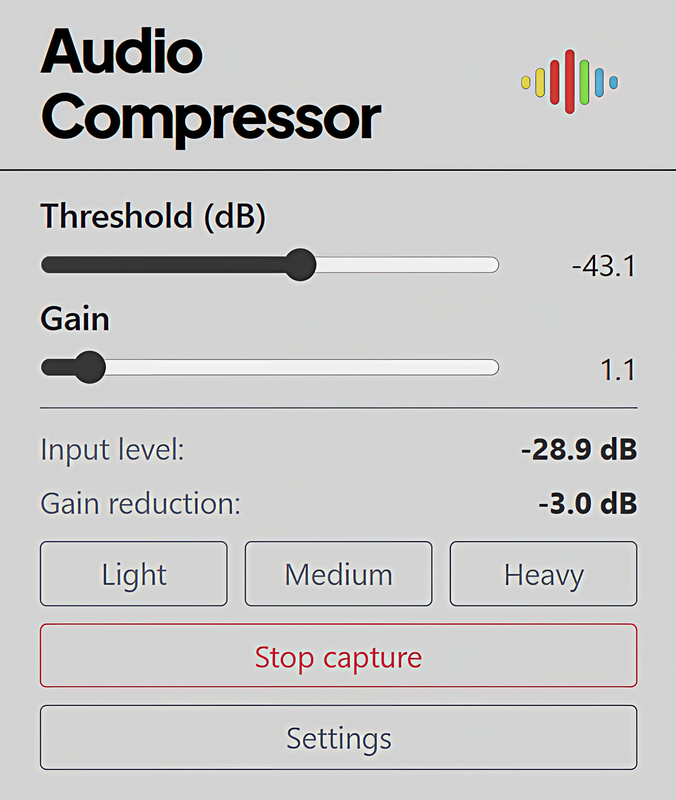
Setup
How to Install
The easiest way is to install from the Chrome Web Store — one click, and Chrome keeps the extension up to date automatically.
Opens the official listing in a new tab.
Developers: load unpacked from GitHub
If you are working from source or prefer a local build, load the extension in developer mode.
- Clone or download the Chromepressor repository from GitHub.
- Open Chrome and go to
chrome://extensions. - Enable Developer mode (toggle in the top-right corner).
- Click Load unpacked and select the Chromepressor folder containing
manifest.json. - Pin the extension to your toolbar for quick access. Click the extension icon on any tab with audio to start processing.
Requirements: Chrome 109+ (Manifest V3). Works with any tab that plays audio — YouTube, Spotify Web, podcasts, video calls, etc.
Features
Everything you need
Threshold & Gain
Set the threshold from -100 to 0 dB. Makeup gain from 1x to 3x compensates for volume reduction.
Full Compressor Controls
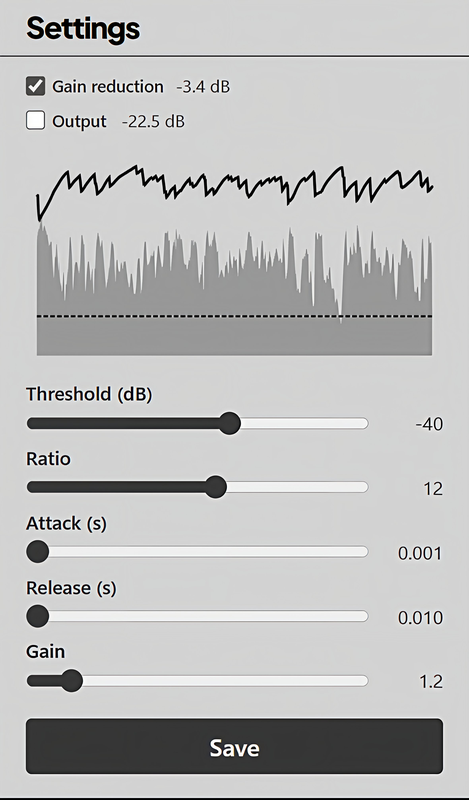
Ratio (2:1 to 20:1), attack (0.001s to 0.1s), and release (0.01s to 1s) in the Settings panel for precise dynamics shaping.
Auto-Threshold Presets
Light (3 dB), Medium (6 dB), and Heavy (12 dB) presets measure your audio for 4 seconds and automatically set the threshold.
Real-Time Visualizer
Gain reduction and output level meters with a scrolling chart in the Settings view. Toggle traces on/off.
Persistent Settings
All parameters are saved to Chrome storage and restored automatically the next time you open the extension.
Stop Capture
Instantly stop tab capture and all processing with one click. Clean start every time.
Use Cases
- Streaming & video calls — Even out mic levels and tame loud participants
- Music listening — Add punch to compressed streaming audio
- Podcasts & audiobooks — Normalize volume across different speakers and segments
- Gaming — Reduce sudden loud sounds while keeping quiet details audible
Interface
Screenshots
Technical